HomeDoorbell footage sharing
Any doorbell camera
Ring doorbell footage sharing with your neighbours
Ring doorbell footage sharing, or a clip from any other doorbell camera, can be sent to the verified neighbours on your street. Save the clip in your camera app and upload it. StreetAlert is not part of Ring or Amazon, and it does not connect to the doorbell.
Works with any doorbell camera
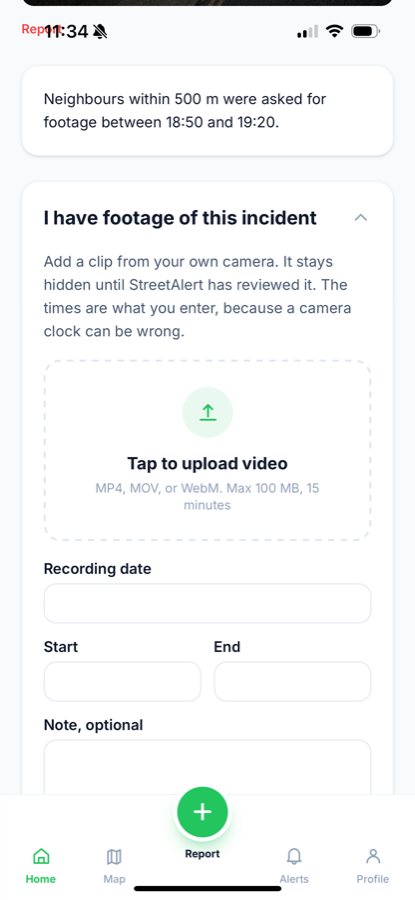
Example screen
How Ring doorbell footage sharing works
The steps are the same for a Ring, Google Nest, Eufy, Arlo, Blink, Hikvision or Reolink camera. Save a clip from that camera's own app, then upload the file. There is no connection to the doorbell.
Use the app that came with the doorbell. StreetAlert does not log in to it.
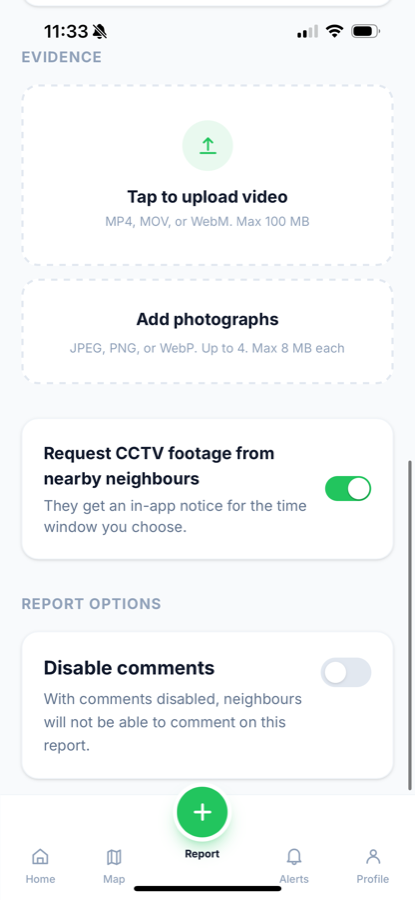
MP4, MOV or WebM, up to 100 MB and 15 minutes. On a new report, up to 5 videos or 4 photos.
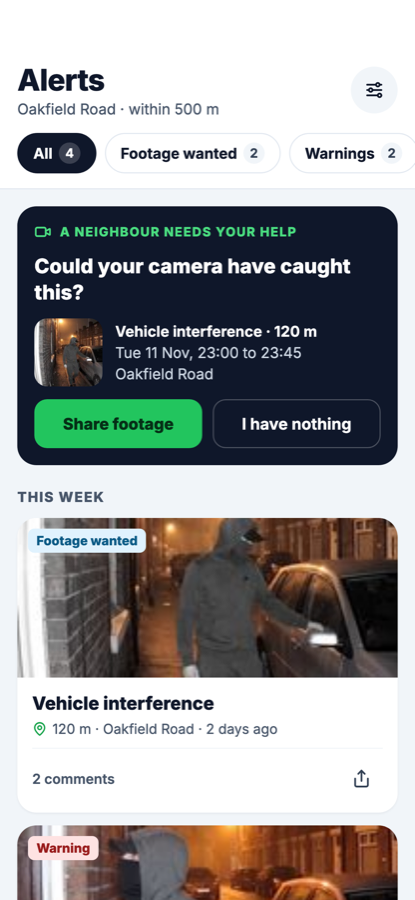
After a review, logged-in residents near the report can watch it. The house is not shown.
Any brand, the same upload
Ring, Google Nest, Eufy, Arlo, Blink, Hikvision and Reolink are named here only so you know a clip from those cameras can be uploaded. StreetAlert is not part of Ring or Amazon. It does not connect to the doorbell, and it does not use that company's colours or sign-in.
A clip is reviewed before any other resident can watch it. Video can be MP4, MOV or WebM, up to 100 MB and 15 minutes. On a new report you can add up to 5 videos, or 4 photos of 8 MB each.
What happens to the clip
It stays a file you chose to upload. It is not a live view of the doorbell.
What it does
- Accepts a clip you saved yourself.
- Reviews it before other residents can watch.
- Lets you delete it later.
What it doesn't do
- Does not connect to Ring, Amazon, or any other doorbell account.
- Does not watch the camera live.
- Does not show the house number to other residents.
Questions
Does Ring doorbell footage sharing connect to my doorbell?
No. StreetAlert is not part of Ring or Amazon. You save a clip in the camera's own app and upload that file. StreetAlert never signs in to the doorbell.
Which cameras can I use?
Any camera you can save a video from, including Ring, Google Nest, Eufy, Arlo, Blink, Hikvision and Reolink. The upload is the same file types for all of them.
Can I delete a clip I've shared?
Yes. The person who uploaded the clip can delete it. It is then removed, so other residents can no longer watch it.
More than doorbell footage
Everything your street needs to know. In one free app.
Sharing footage is just the start. StreetAlert also keeps you up to date with real figures, your local police and the things that matter on your road.
- Crime on your roadPolice-recorded crime for your road, area and town, updated every month.
- UK crime mapSee crime across the country, then zoom into any town street by street.Open the map →
- Your local police teamWho they are, what they're focusing on, and when you can meet them.
- Lost and foundMark where you lost it. Neighbours close by can see it, and a lost pet sends a notification.
- Verified neighboursAlerts come from people who've confirmed they live nearby.
- Only the alerts you chooseApp, email, text or WhatsApp. No chit-chat, no arguments.
- NewFlood and weather warningsEnvironment Agency flood warnings and Met Office weather warnings for your home. Only the ones you choose.
- NewPlanning applicationsNew applications near your home. You choose the distance, and it stays off until you turn it on.
Free for every street in the UK.
Join free